How to Crop a Video Online Free (Any Aspect Ratio)
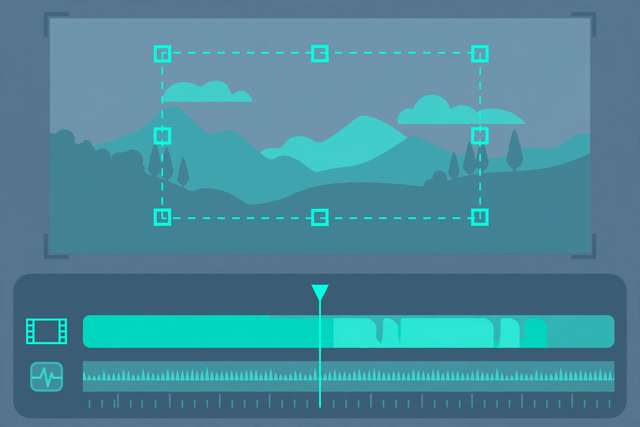
One video, five platforms — and every platform wants a different shape. YouTube wants wide 16:9, TikTok and Reels want tall 9:16, Instagram feed likes square. Cropping is how you reframe one recording for all of them, and you can do it free in your browser.
What video cropping actually does
Cropping cuts pixels off the edges of your video — it does not stretch or squeeze anything. A 1920×1080 (16:9) video cropped to 1080×1080 (1:1) keeps the middle 1080 pixels and discards 420 pixels from each side. Subjects keep their natural proportions; you just see less of the scene.
This is different from resizing (changing the pixel dimensions of the whole frame) and letterboxing (adding black bars). Cropping is the right tool when you want to reframe or change aspect ratio.
How to crop a video online (step by step)
- Open our free video cropper — it runs entirely in your browser, so your footage never uploads anywhere.
- Drop in your video file (MP4, MOV, WebM, and most common formats work).
- Choose a preset aspect ratio — 16:9 for YouTube, 9:16 for TikTok/Reels/Shorts, 1:1 for feed posts — or drag a custom crop box.
- Position the crop box over the important part of the frame. Keep faces and action centered with a little headroom.
- Preview, then export and download. No watermark, no signup.
The whole job takes under two minutes for a typical clip.
Cropping vs. reframing tricks
Static crops are not your only option. A slow zoom-in during the crop (the Ken Burns effect) adds motion to still-feeling footage, and keyframed crops let the crop box follow a moving subject — effectively a pan. Both are just crops that change over time, and most browser croppers support at least a fixed zoom. Use them sparingly: one reframing move per clip is plenty.
Aspect ratio cheat sheet
- 16:9 (1920×1080): YouTube, Vimeo, presentations, TV. The default “landscape” shape.
- 9:16 (1080×1920): TikTok, Reels, Shorts, Stories. Full-screen vertical.
- 1:1 (1080×1080): Instagram/Facebook feed posts. Maximum feed real estate for a square.
- 4:5 (1080×1350): Instagram portrait posts — actually takes up more screen space than square in the feed.
- 21:9: cinematic ultrawide for film-style content (adds letterbox bars on most screens).
Cropping strategy: one shoot, every platform
Smart creators shoot once and crop many times:
- Shoot wider than you need. Record in 16:9 at the highest resolution available — 4K if possible. Extra pixels are cropping headroom.
- Keep subjects centered. Frame interviews and talking-head shots with the subject in the middle third, so both vertical and square crops keep them.
- Crop vertical first. The 9:16 crop is the most destructive (you lose ~75% of a 16:9 frame), so nail the vertical framing, then derive square and wide versions.
- Check text and captions. Burned-in text near the edges of a wide video gets amputated in vertical crops. Keep on-screen text in the central “safe zone.”
Quality tips
Start with more pixels than you need. Cropping a 4K video to 1080×1920 vertical still leaves you full HD. Cropping a 1080p video to vertical leaves you 608×1080 — visibly soft on phones.
Do not upscale the crop. Exporting a 608-pixel-wide crop as 1080 wide does not add detail — it just smears the pixels you have. Export at the crop’s native resolution.
Watch the bitrate. Cropped videos re-encode on export. Use a healthy bitrate (8–12 Mbps for 1080p) so the re-encode does not introduce blockiness.
Crop before captions. Add subtitles and graphics after cropping, positioned for the final aspect ratio — not before, where they may get cut.
Frequently asked questions
How do I crop a video to a different aspect ratio? Set your target ratio (like 9:16 for Reels), drag the crop box over the area to keep, and export. The tool cuts away everything outside the box.
Will cropping a video reduce its quality? Cropping removes pixels, so the output has fewer pixels than the source. Start with the highest-resolution source you have and avoid upscaling the crop.
Can I crop a video without a watermark for free? Yes. Browser-based tools like our free video cropper export clean files with no watermark, no account, and no usage limits.
What aspect ratio should I use for TikTok and Reels? 9:16 vertical (1080x1920). For YouTube use 16:9 (1920x1080), and for Instagram feed posts 1:1 square (1080x1080) or 4:5 portrait.
Keep reading

How to Convert MP4 to MOV Online Free
Convert MP4 to MOV free for Apple workflows — Final Cut Pro, iMovie and QuickTime. Methods, settings, and when MOV actually matters.
Read more →
How to Add Fade In and Fade Out to Audio Online Free
Add fade in and fade out to audio online free. Smooth harsh audio endings and jarring starts in seconds with our browser-based fade editor.
Read more →
How to Convert MOV to MP4 Online Free
Convert MOV to MP4 online free. Turn iPhone MOV videos into universally playable MP4 files in your browser — no signup, no watermark.
Read more →