50 Flat Vector Illustration Prompts for Bloggers
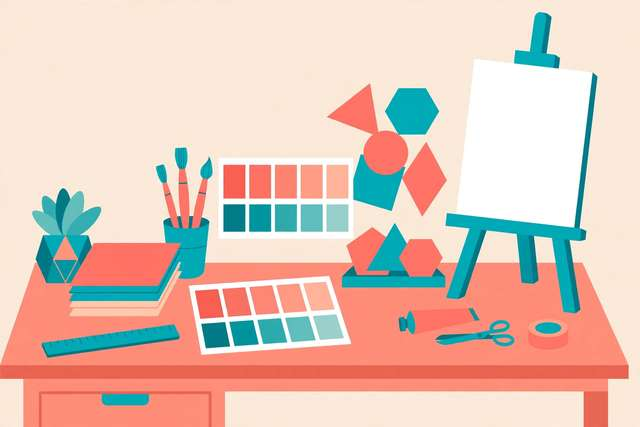
Stock photos are starting to look the same everywhere, and custom illustration used to mean hiring a designer. AI image generators changed that — but only if your prompts are specific enough. Vague prompts produce vague art. These 50 flat vector illustration prompts for bloggers are written the way generators like them: style first, then a concrete scene, then a palette, with “no text” baked in so you never get garbled words in your artwork. They are grouped by blogger use case — hero images, section dividers, finance topics, tech tutorials, lifestyle, and about pages — and every one is original, with no brand names or trademarked characters. Copy a prompt, generate, and you have cohesive, on-brand visuals in minutes.
What’s inside this pack
The 50 prompts are organized into six groups matching real blog layouts. Blog hero images (10) are landscape scenes built to sit behind or beside a headline — desks, journeys, metaphors like coin trees and paper boats. Section headers and dividers (8) are ultra-wide, quiet compositions that separate long articles without shouting. Finance and money topics (8) give you original alternatives to the same tired stock imagery. Tech and tutorials (8) cover the how-to visuals every guide needs. Lifestyle and wellness (8) handle the personal side of blogging. About pages and personal branding (8) give you warm, welcoming art for the pages that introduce you. Each prompt ends with a palette suggestion so art across your site feels like one set.
Illustration prompts (free sample)
These twelve samples — two from each group — show the pattern. All 50 prompts are in the free download at the bottom of this page.
- Flat vector illustration, landscape, no text: a cozy home office desk with a laptop, coffee cup, and a small plant, warm morning light through a window, coral and cream palette
- Flat vector illustration, landscape, no text: a rocket launching from an open laptop screen, stars and paper planes trailing behind, purple and gold palette
- Flat vector illustration, ultra-wide, no text: paper planes flying in formation across a soft sky with dotted flight paths
- Flat vector illustration, ultra-wide, no text: ocean waves in layered flat bands with a small sailboat, navy and white
- Flat vector illustration, no text: a piggy bank with coins dropping in and a small sprout growing from the slot, mint and gold palette
- Flat vector illustration, no text: a bar chart growing like a plant from a pot of coins, teal palette
- Flat vector illustration, no text: a laptop with gears and puzzle pieces floating above the keyboard, assembling themselves, indigo palette
- Flat vector illustration, no text: a magnifying glass over lines of abstract code blocks revealing a checkmark, dark slate and lime
- Flat vector illustration, no text: a morning routine scene with a yoga mat, water bottle, journal, and sunrise window, peach palette
- Flat vector illustration, no text: a cozy reading nook with an armchair, floor lamp, books, and a cat silhouette, warm amber
- Flat vector illustration, no text: a friendly character waving beside a desk with a laptop and a stack of books, welcoming coral palette
- Flat vector illustration, no text: an open door with warm light spilling out onto a path of stepping stones, inviting amber palette
How to use these prompts
- Copy a prompt from the group that matches where the image will live on your page.
- Paste it into your AI image generator as-is, adding only your preferred aspect ratio at the end.
- Generate two or three variants and pick the cleanest composition — flat vector styles vary between runs.
- If the generator sneaks text into the image, regenerate rather than trying to fix it; the “no text” instruction works best on a fresh run.
- Reuse the same palette words across posts to build a recognizable visual identity for your blog.
One more tip: generate at a larger size than you need and compress down. Vector-style art downscales beautifully and stays crisp on retina screens.
Frequently asked questions
Why do the prompts say “no text”? AI image generators still garble rendered text more often than not. Keeping text out of the prompt avoids misspelled words baked into your artwork; add headlines and labels afterward in your design tool where you control the typography.
Can I use AI-generated illustrations commercially on my blog? On most major generators, yes — paid tiers typically include commercial rights. Always check your specific tool’s current terms, since policies differ between providers and change over time.
How do I keep illustrations consistent across my whole blog? Stick to one style phrase (“flat vector illustration”) and recycle the same two or three palette descriptions across every prompt. Consistency comes from repeating the style and color language, not from the subject matter.
Keep reading
100 Blog Introduction Hooks That Keep Readers Reading
100 copy-paste blog introduction hooks that stop the bounce: curiosity openers, story leads, mistake hooks, and bold promises. Free download.
Read more →
How to Convert an Image to SVG Vector Online Free
Convert an image to SVG vector online free: turn JPG or PNG photos and logos into scalable vector files — and understand what tracing can and cannot do.
Read more →
25 SEO Blog Post Outline Templates
25 copy-paste SEO blog post outline templates: how-to, listicle, comparison, review, and pillar outlines. Free markdown download pack.
Read more →