How to Split an Image into an Instagram Grid (Free, No Cropping Guesswork)
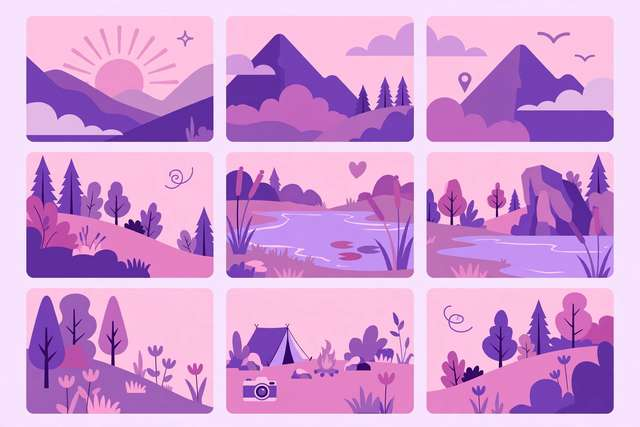
An Instagram grid post — one big image split across 3, 6, or 9 tiles — is the fastest way to make a profile look designed. Brands, photographers, and creators use puzzle grids to turn their profile page into a single striking mosaic.
The catch: the tiles have to be exact squares, posted in exactly the right order, or the mosaic comes out scrambled. Here is the no-guesswork method.
How Instagram grids work
Your Instagram profile displays posts as a 3-column grid, each thumbnail a perfect square. A “grid split” takes one wide image, slices it into equal squares, and you post them so the profile reassembles the full picture. The classic layout is 3 rows × 3 columns = 9 tiles, but 3×1 (a single row banner), 3×2, and even 3×4 strips all work.
Critical detail: post in reverse order. Instagram stacks newest posts at the top-left of your grid, filling right-to-left. So you post the bottom-right tile first and the top-left tile last.
Step-by-step: split your image
Step 1 — Pick a wide, high-resolution image. For a 3×3 grid at full quality, your source should be at least 3240px wide and 3240px tall (3 × 1080px tiles). Landscapes, flat-lays, and bold graphic designs split best; busy portraits can look awkward sliced.
Step 2 — Slice into exact squares. Use our free Instagram grid splitter to cut the image into equal 3×3 tiles in one click — or crop each tile to a perfect square manually with our free image cropper. Square tiles are non-negotiable, because Instagram crops every thumbnail to 1:1 anyway.
Step 3 — Number your tiles. Label tiles 1–9 from top-left to bottom-right as you export them. This is the step everyone skips and regrets.
Step 4 — Post in reverse. Upload tile 9 (bottom-right) first, then 8, 7… down to tile 1 (top-left) last. Post them in one sitting — a gap of hours between tiles confuses followers and breaks the reveal.
Step 5 — Check the profile. View your profile grid after the last post. The mosaic should read as one continuous image.
Grid layouts that work
- 3×3 puzzle (9 tiles): the full mosaic. Maximum impact, maximum commitment — your next 9 posts are spoken for.
- 3×1 banner row (3 tiles): one horizontal strip. Great for announcements, quotes, or a panorama slice, without locking your whole feed.
- 3×2 block (6 tiles): a compact rectangle. Good for before/after reveals or event promos.
- Single-row tease: post just 2 tiles of a 3-tile row with the third coming “soon” — drives profile visits.
Design tips for a clean mosaic
Keep key subjects off the cut lines. Faces, logos, and text sliced in half look broken. Compose so important elements sit in tile centers.
Use consistent editing. Apply the same filter, brightness, and color grade to the whole image before splitting. Editing tiles individually creates visible seams.
Mind the profile crop. Instagram profile thumbnails show a slightly tighter crop than the full post view. Keep critical content away from tile edges.
Plan what comes after. A puzzle grid dominates your profile until new posts push it down. Some creators delete the grid after a campaign; others build their whole feed around rotating mosaics.
Common mistakes
Posting in forward order. The #1 error. Forward order assembles the image upside-down relative to your intent — it looks like a glitch, not a design.
Non-square tiles. If tiles aren’t perfect squares, Instagram’s automatic center-crop shifts each one unpredictably and seams appear.
Low-resolution source. A 1080px-wide image split 3 ways gives 360px tiles — visibly soft on modern phones. Start big.
Forgetting captions. Tiles posted bare look like spam. Write one continuous caption split across the tiles, or number them (“3/9”) so followers understand the series.
Frequently asked questions
How do I split a photo into an Instagram grid? Slice your image into equal square tiles (usually 3x3), then post them in reverse order — bottom row first — so they assemble into one big picture on your profile grid.
What size should each grid tile be? Each tile is posted as a square, and Instagram displays them at 1080x1080px. Make each tile a perfect square at 1080px or larger for crisp results.
In what order do I post grid tiles? Post in reverse: bottom-right tile first, ending with top-left last. Instagram’s profile grid fills right-to-left, bottom-to-top, so reverse order assembles the image correctly.
Will splitting hurt my image quality? Not if you start with a high-resolution image. Use a source at least 3240px wide for a 3x3 grid (3 × 1080px) and export tiles as high-quality JPEG or PNG.
Keep reading

How to Create Hashtags for Instagram & TikTok (Free)
Stop guessing hashtags. Learn the hashtag strategy that gets reach on Instagram and TikTok, plus a free generator that builds them in seconds.
Read more →
How to Write a Bio That Converts (Free Generator)
Your bio has 3 seconds to win a follower or customer. Learn the bio formula that converts, with examples for Instagram, TikTok, and X.
Read more →
Instagram Story Dimensions 2026: Exact Sizes + Free Resizer
Instagram story dimensions for 2026: the exact 1080x1920 size, safe zones, file specs, and a free online resizer that fits any photo perfectly.
Read more →